Check Point reported:
Find the original article here.
Email security researchers at Check Point have recently uncovered a phishing campaign where attackers impersonate file-sharing and e-signature services to deliver finance-themed lures that look like legitimate notifications.
To boost credibility, the emails copied official service visuals (Microsoft and Office products logos), used service-style headers, footers, and “review Document” buttons, and spoofed display names such as “X via SharePoint (Online)”, “eSignDoc via Y”, and “SharePoint”, closely matching authentic notification patterns.
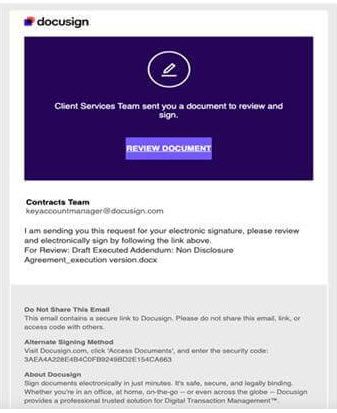
Alongside the large SharePoint/e-signing campaign, researchers also identified a smaller but related operation that imitates DocuSign notifications. Like the primary attack, it impersonates a trusted SaaS platform and leverages legitimate redirect infrastructure, but the technique used to mask the malicious destination differs significantly.
To boost credibility, the emails copied official service visuals (Microsoft and Office products logos), used service-style headers, footers, and “review Document” buttons, and spoofed display names such as “X via SharePoint (Online)”, “eSignDoc via Y”, and “SharePoint”, closely matching authentic notification patterns.
Alongside the large SharePoint/e-signing campaign, researchers also identified a smaller but related operation that imitates DocuSign notifications. Like the primary attack, it impersonates a trusted SaaS platform and leverages legitimate redirect infrastructure, but the technique used to mask the malicious destination differs significantly.
Find the original article here.
Key Takeaway: Don't click the link in the email. Go to your bookmark or password manager to load the site. Further, only click on e-signing emails if you have been notified in advance by the sender to expect the request.
Enroll in Training Sessions: Last Thursday of Every Month is Training on Frauds and New Scam Alerts and How to Combat
Enroll in Training Sessions: Last Thursday of Every Month is Training on Frauds and New Scam Alerts and How to Combat